

<Back to Search
Walk for Parkinson's 100 Mile Challenge

Date
Saturday 1 May to Monday 31 May 2027

Price
Free

Suggested fundraising target
£100

Location
Anywhere you like
<Back to Search

Take part solo or as part of a team

Complete the challenge in your own time

Support the Parkinson’s community
Walk for Parkinson's 100 Mile Challenge
1 May to 31 May 2027
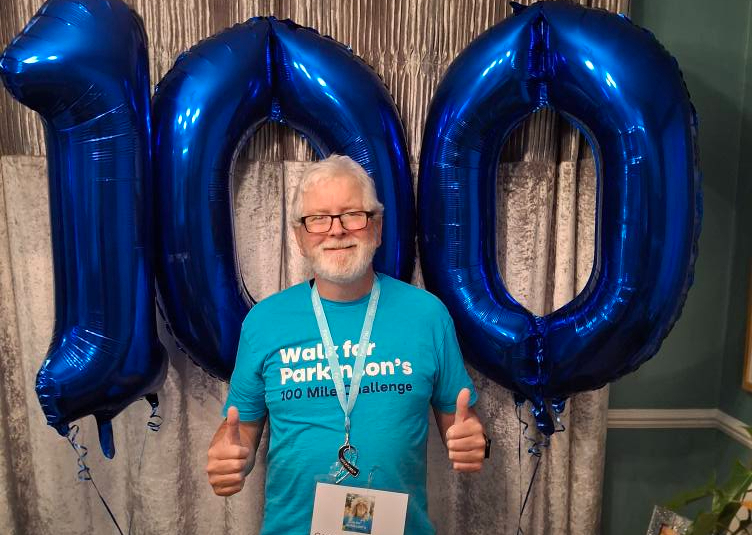
Walk 100 miles in May
Walk in your own way, at your own pace, anywhere you like, from long weekend walks, to short after-work strolls. 100 miles is our suggested distance, but the most important thing is to challenge yourself. Choose a distance that feels rewarding and achievable for you.
Join the Walk for Parkinson's team and do something great this spring.
How it works

1. Sign up for free
Your fundraising page will be automatically created for you. Give it a personal touch by sharing why you’re taking part.

2. Track your miles
Start walking on Saturday 1 May and track your progress using a fitness app, or upload your miles manually.

3. Fundraise!
Share your page with friends and family, post updates and start fundraising. We can't wait to see how you get on!
Get social
Join our private Walk 100 Facebook group for motivation, fundraising tips, updates and to connect with your fellow walkers.
Fundraising rewards
Branded T-shirt
Raise £50 to get a Walk 100 mile challenge T-shirt.
Challenge medal
Raise £100 to receive a medal at the end of your challenge.
Mystery reward
Raise £200 to unlock an exclusive Parkinson's UK reward!
Your fundraising page
Your fundraising page will be set up automatically when you register. Personalise it by sharing your reason for walking. Share your link with family and friends and watch your totaliser go up!
Last year, Walk 100 raised an incredible:
£106,772
FAQs
What is the Walk for Parkinson's 100 mile challenge?
Walk 100 miles throughout May, either on your own or as part of a team. You can complete the challenge anywhere and at any time between Thursday 1 May and Saturday 31 May.
Who can take part?
Anyone of any age can take part. Whether you’re new to longer-distance walking, looking for a family activity or training for another event, you’re welcome to join. If you have any health concerns, please speak to your doctor before taking on the challenge.
Is there a fundraising target?
We encourage everyone to raise at least £100. Every pound raised helps fund Parkinson’s nurses and specialist healthcare across the UK.
Do I have to walk 100 miles?
No. 100 miles is a suggested distance. If you’d prefer to walk a different distance, you can change your target on your fundraising page.
Can we take part as a team?
Yes. This is a great team challenge! You can walk together or separately and combine your fundraising total on a team page.
How can I create or join a team?
- Sign up, select how many people you’re registering, and click the ‘next step’ button.
- Enter your personal details and click the ‘next step’ button.
- On the ‘Your fundraising page’ step, select 'create team' at the bottom of the page.
- Choose a team name and a fundraising target. We suggest a target of £100 per person, but you can change this to whatever target you decide.
- Choose whether your team is public or private. If you select ‘private’, members can only join by invitation.
Create a team once signed up
- Log in to your account from the Walk 100 Miles homepage. You can do so by clicking on the symbol in the top right corner of the page.
- Once logged in, hover over your name in the top right corner and select 'Dashboard' from the drop down menu.
- In your dashboard, select the 'Create a team' button in the middle of the page.
- Fill in all the details for your team fundraising page.
- Choose a team name and a fundraising target. We suggest a target of £100 per person, but you can change this to whatever target you decide.
- Choose whether your team is public or private. If you select ‘private’, members can only join by invitation.
- Click the 'Create team' button at the bottom of the page.
- Sign up, choose the individual entry option, and select ‘next step’.
- Fill in your personal details and select ‘next step’.
- On the 'Your fundraising page' step, complete your fundraising page details, then select 'Join a team' at the bottom of the page.
- Look up a team in the search bar and select the one you'd like to join.
Join a private team through an invitation
- Private teams can be joined by invitation.
- A member of the team will need to log in to their fundraising account by going to the Walk 100 miles homepage and selecting ‘login’ in the top right hand corner.
- The member must then go to the team dashboard. This can be accessed through the drop-down menu by selecting the person icon in the top right corner of the website.
- Select the team dashboard and this will show a link. Copy this link and share it via social media or email.
Join a public team once signed up
- Go to the page of the team you want to join. You can either get the link directly from a team member or find the top teams in the leaderboard section of the Walk 100 Miles homepage.
- Under the team name in the centre of the page, there is a 'Join us' button. Select this to join the team.
Do you have any fundraising advice?
Visit the fundraising hub for some handy resources to help support your fundraising.
If you'd like further fundraising advice, please contact our fundraising team at walk@parkinsons.org.uk.
How do I use MapMyFitness, Garmin, and Fitbit? How do I connect them to my fundraising page?
Your profile page shows your personal distance tally, so you can track your progress towards your target. This is a great way to keep your friends updated!
Follow these steps to track your miles automatically using Fitbit or MapMyFitness apps:
- Download Fitbit, Garmin Connect or Mapmyfitness and set up your account
- Log in to your Walk 100 miles account by going to the Walk 100 miles webpage and clicking the log in icon in the top right corner.
- In your dashboard, navigate to 'My Fitness Activity'.
- Under the heading ‘Connect your preferred Fitness app’, click your chosen app.
- Follow the prompts to connect your account.
- When you walk, select ‘start your workout’ in the app on your phone. When you finishyour walk, save your workout and your distance will be added to your tally on your page the following day.
If you’ve synced your app but it’s not working, log in and re-connect it.
- When using Fitbit or Garmin, you must ‘start’ an activity and save it. Your daily steps will also automatically add to your page. If you’re having issues, try syncing through both your device and the devices app on your smartphone.
- When using MapMyFitness, you must ‘start’ your workout, ‘stop’ your workout and then ‘Save’ your workout.
Your tally will be updated each day with the previous day’s distances.
How will Parkinson’s UK know when I have completed my miles?
Once you’ve connected your account following the steps above, all miles from MapMyFitness, Fitbit or Garmin will be automatically logged with us.
If you have issues with MapMyFitness or Fitbit during your walk, follow the steps below to upload your distance manually.
Can I track my miles without using an app?
Follow these steps:
- Log in to your account. You can log in by clicking on the symbol in the top right corner of the Walk 100 miles webpage.
- Hover over your name in the top right corner of the page and click on 'My Fitness Activity'.
- Under 'Add Activity' you can edit the date and distance.
- Click ‘save’ and then refresh your page. Your miles should now appear in your feed.
When is the fundraising deadline?
How do I pay in my offline fundraising?
If you received any cash donations, please pay them into your bank account and then use one of the following options once your fundraising is complete.
Fundraising page
You can donate to your own fundraising page and the money will be transferred to us automatically.
By post
For security reasons, please don’t send cash directly through the post. We’re more than happy to accept your funds by cheque.
Please make your cheque payable to Parkinson’s UK and get in touch before you send it. We’ll give you a unique reference number to use as your payment reference.
Send it to:
Supporter Care
Parkinson’s UK
50 Broadway
London
SW1H 0DB
Don’t forget to include your completed sponsorship forms.
By phone
Call our friendly Supporter Care team on 0800 138 6593 and pay using a debit or credit card.
Online banking
You can transfer your offline donations directly to us by bank transfer. Please get in touch before you send any money, and we'll provide the bank details as well as a unique reference number to use as your payment reference.
Pay in online
Pay online using a debit or credit card or via PayPal at parkinsons.org.uk/donate. Please note that we’re unable to claim Gift Aid on collections or other group donations if you pay in your money this way.
Will I get a medal at the end?
Will I get a T-shirt and when will I receive it?
Does everybody in the team get their own fundraising reward?
Contact us
We’re here to support you every step of the way.

Email us


